Sunday, October 6, 2013

Anchor Charts to Worksheet Tutorial

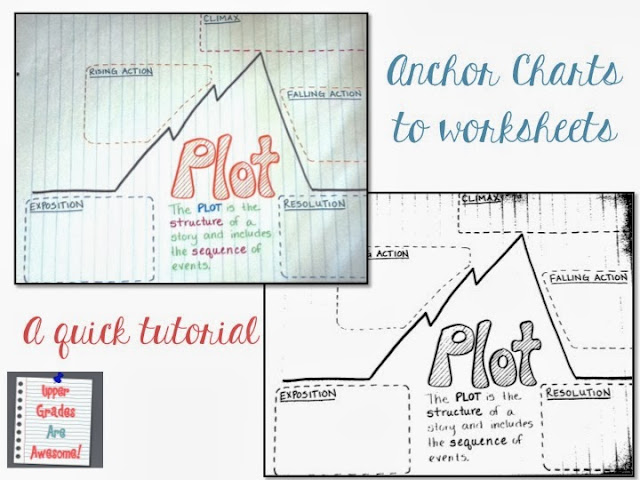
Alright, I am attempting my first tutorial here! This is how I use PPT to make an anchor chart into a worksheet. It isn't perfect, but it is quick and easy! If you prefer to use Word, the tools and steps are pretty much the same.


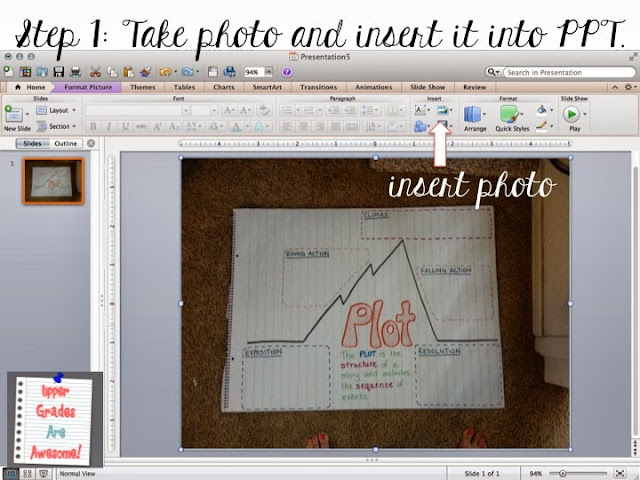
We'll be doing a lesson on plot when we return from our fall break, so I created the basic anchor chart and left blanks where we are going to fill it in as a class. Then, I snapped a quick shot with my cell phone and emailed it to myself.

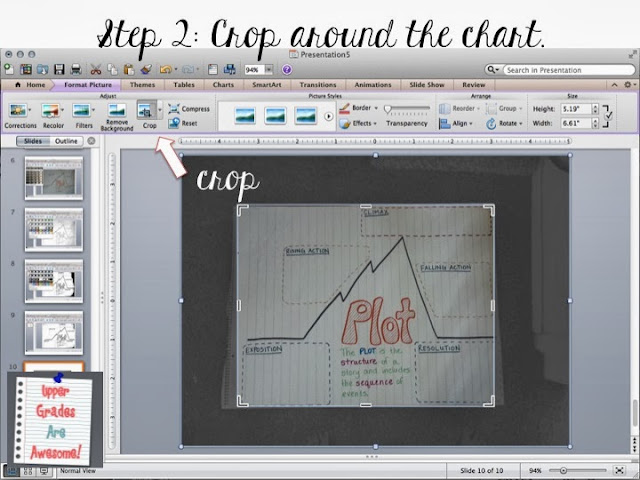
Drag the photo into PPT or use the "insert a picture" tool. I don't want my students to admire my pedicure so it is time to crop this baby!

You can use the "remove background" tool, which either does a fantastic job or a strange one, or just use the crop tool to get rid of whatever happens to be in the background that you don't want. Bye-bye toes!


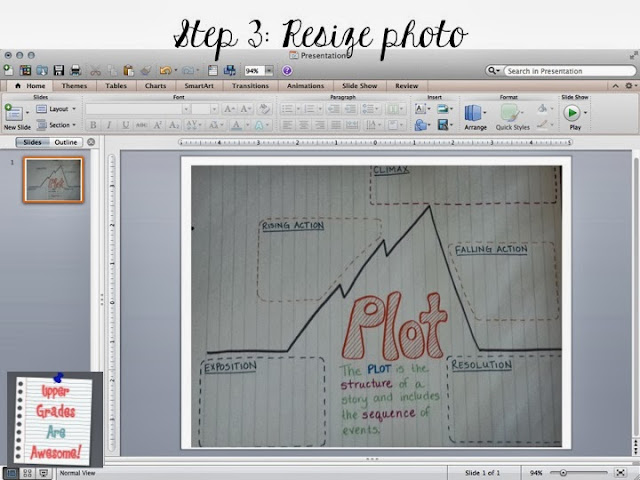
Resize the photo so that it fills up most of the slide.

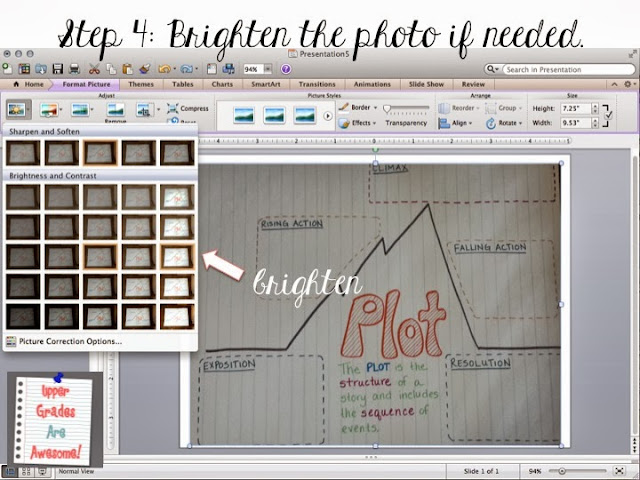
Since I didn't bother to get out my DSLR or even open the blinds this photo needed some brightening up. Your photo will probably be better quality than mine. Decide if you need to brighten it up or not.

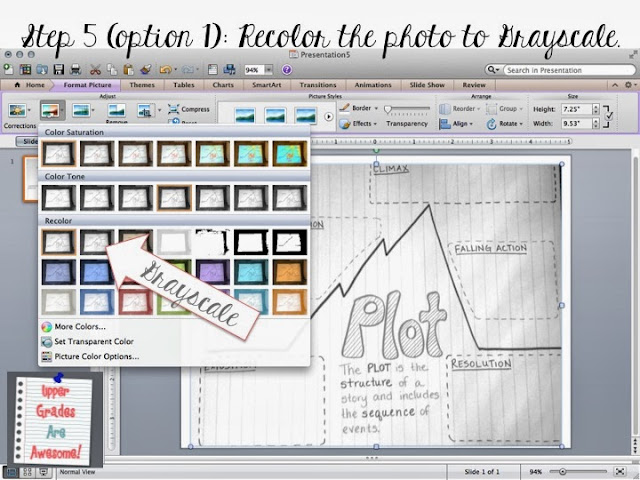
There are two options that I have used to make my black and white worksheet. It depends on the photo quality, lighting, and sometimes the colors I used on the anchor chart. Here is the grayscale option. You can see that most of the chart is a gray color, and this will mean more ink when you copy it. To get more of a white try option 2.

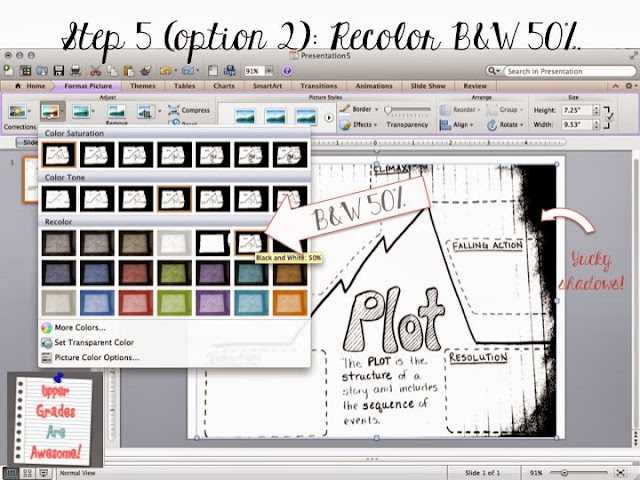
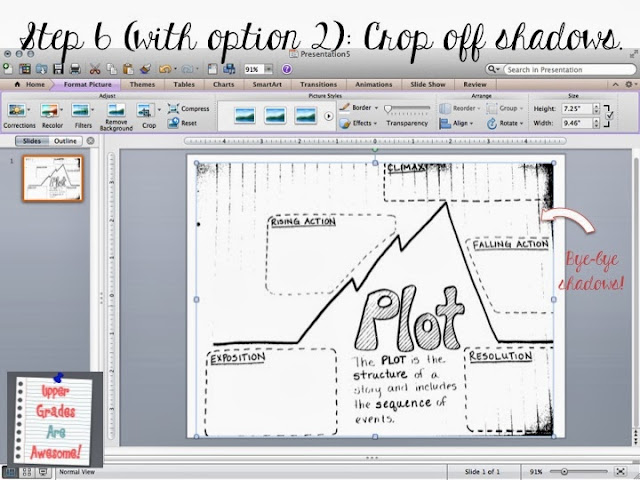
I find that the "Black and White: 50%" tool usually gets a great contrast. Unfortunately, because I didn't consider lighting when I took the photo I got some nasty shadows on the side. If this happens I would either use option 1, or just crop the shadows off.

Now most of the shadows are gone and I am ready to print my worksheet! I hope my first tutorial was useful!

Saturday, October 5, 2013

Reading Workshop - Turn Anchor Charts into Fillable Worksheets

I am currently smack dab in the middle of my fall break. Our district is on a modified year round schedule that I love! We finished up 1st quarter at the end of September and then get two glorious weeks off. This past week we helped my sister move into her new house (congrats sis!), I worked on some new resources (Calendar Math Semester 2 - on sale through tomorrow, and a new Lapbook/Interactive Notebook for the Age of Exploration!), played with my kitties and ratties, saw some friends, and rested my knee (it's still on the mend). Next week we are off on a mini-vacay to Disneyland and California Adventure. We're taking my MIL and she is so excited I think she was packed at least a week ago!

My to-do list is still longer than I will have time for but I desperately need to post some proper blog entries! Today I have a little tip for anchor charts, although I assume I'm not the only teacher that does this. This is my first year doing Reading Workshop and using anchor charts, but I wanted to make them more meaningful and useful to my students. Our first eight anchor charts we created together as a class, the students gave input, I wrote them out, and then I took photos of them and gave them a copy to keep in their notebooks to reference back to.


I promise they are easier to read in reality than on this photo. But I managed to fit all eight on one page. But, I still felt that there was something missing. I wanted the students to have their own mini-anchor charts to fill out as we did as a class. With a few easy steps I quickly turned our anchor charts into fillable worksheets. 


So, I decided to create most of the anchor chart and leave the "notes" part blank. I snapped a quick photo with my cell or point-and-shoot - nothing fancy- and then uploaded them to Word or PPT. Actually, I tried to use Picasa first, but I couldn't get a proper B&W contrast. Microsoft has a great photo filter that easily makes the photo B&W and printable. 

My before photo of the Theme Anchor Chart is sitting on my school computer, so just imagine that the inside of the heart was left blank. In the second photo you can see that my student wrote exactly what we wrote as a class inside the heart. This is hole punched and kept in their Reading Workshop Binders. 


My students were pretty impressed with this. Many couldn't figure out how on earth their worksheet looked exactly like the anchor chart in front of them. Minds were blown! 

Most of the anchor charts I have been using I've borrowed/adapted from Pinterest. Thank you to all those teachers who share their anchor charts for newbies like me. You can follow my anchor chart board to see some of the ideas I've gathered. 

Wednesday, October 2, 2013

Calendar Math Semester 2 is finally here!

I absolutely love using calendar math as a part of my intervention math class. The activities are mostly a review of concepts that my kiddos should have mastered but still need tons of practice on. Plus it is easy and stress-free for the aid who runs this group. Last year I created a double sided page for each of the first two quarters and I had anticipated creating two more for the second semester. Well, my intervention kids were just not ready to move on, and each page lasted two quarters instead of one. Creating more Calendar Math pages was put on the back burner, but now that I am on fall break for a couple of weeks I put it at the top of my to-do list. After some scanner drama I have the semester 2 files up and ready!

The newest pages include some of the same important skills and pattern building as semester 1, and I've added some new concepts too. The students will practice:
• Word form
• Expanded form
• Double digit multiplication with model
• Long division with model
• Long division with decimals
• Convert fractions, decimals, and percents
• Multiplying decimals
• Use a number line
• Compare fractions
• Mean, median, mode, and range
• Ordering whole numbers
• Elapsed time
• Adding fractions with unlike denominators


I really appreciate all the great feedback I've received about teachers having success with this in their classrooms as well as areas to make it even better. I kind of promised this version awhile ago, so to thank those that have been waiting for this it is currently 50%! It'll only be on sale through Sunday, so get your's now!

Saturday, September 21, 2013

Reddit Gifts for Teachers ROCKS!

Last year a teacher friend received a bunch of goodies for her classroom from an anonymous gift giver through Reddit's Gifts for Teachers. She reminded me about it this year right before the deadline. I didn't think I would be matched with a gifter as there were over 8,000 teachers applying and about 5,000 gift givers, but I was! A lovely gal from Texas sent my class 60 sticky note pads!

Each of my students has a pencil bag in their Reading Workshop binder that includes a pack of 3" x 3" sticky notes. My students use them daily during independent reading time and I knew that they were going to need more throughout the year, so I asked for this simple gift, but I wasn't expecting so many to arrive! When I brought out the giant stack and explained that an anonymous person gifted them to us they were so appreciative and also excited because now there are color options (I only purchased yellow for them).


Thank you to our awesome gift giver and to Reddit Gifts for Teachers for putting this together!


Saturday, September 14, 2013

Confined to the sofa

In my last post I promised more classroom photos, but we've been so busy learning I've been forgetting to take photos, and then, I did something to my knee. It started feeling stiff on Monday, so I figured some yoga would help stretch things out. The next day it felt a bit worse so I went to work anyway, bought a brace after school and iced it. On Wednesday it was even worse so I knew that I needed to get off of it. I went to the chiropractor on Thursday and he said no work for a few days. So I've been confined to the sofa, either in pain or uncomfortable, and having a hard time sleeping. The chiropractor worked on it a bit more on Friday, but I'm still here on the sofa, kinda miserable.


Lesson plans took about 4 hours, but I had a fabulous sub on Thursday and Friday. Today I ventured out to a coffee shop to meet my pal Laura from Daisy's Book Bag to work on some TpT stuff and get some crutches from her. Thanks Laura for the company and crutches! 

While I have been confined to my little nest I've been working on a few things...one new product and spiffying up some of the first things I posted on TpT. They are great products, but my covers weren't the most attractive. When I first started I was hesitant about purchasing clip art and graphics because I was new to the whole thing and wasn't sure what I was getting into. Now I'm kinda going crazy with the digital papers and cute graphics! 

First my new product! Last week I was copying my Biography of a Scientist mini-research project and one of the 3rd grade teachers was checking it out. She said she wanted one for explorers, and I thought, hey, we do explorers in 5th too! I should totally do this! So here is the Biography of an Explorer. Aren't the graphics sweet! 


It was makeover Saturday for a few of my other products! They are so shiny and new now!


Next week shall prove interesting. On Wednesday the entire 5th grade is off to JA BizTown and I am so glad that we finished all of the prep work before I had to be out. Hopefully I won't miss out on the simulation on Wednesday!

Monday, September 2, 2013

A bit of this and that and . . . a Flash Giveaway!

It's amusing to me that most teachers have either just barely started the 2013-2014 school year, or are starting tomorrow. My district on the other hand has been in school for six weeks already. Last week we had parent teacher conferences! Prepare for a jumbled post, but don't miss my flash giveaway somewhere in here, it's your reward for wading through!

So far, the first month and a half of school have come and gone in a blink of an eye! I'm sure this is due to the fact that we are busy, busy, busy! In less than two weeks we are off to our JA BizTown simulation, so we have been engrossed in our lessons on financial literacy, learning how to write checks and balance a checkbook, and applying for jobs. I'm so excited and I know that my kids are going to love it!

I am absolutely loving Reading Workshop. I know I'm not doing everything "right", but already I know that my students are loving reading and really value their independent reading time. I'm still shaky about the grading portion of reading workshop, any tips?!?!

Parent teacher conferences good not have gone smoother. I love the families that I get to work with. Most of my conferences were just chatting with the kids and their parents, and my cheeks were hurting from the smiles and laughs that we shared. It's good when everyone (parents, kids, teachers) can discuss a child's progress as a team! Not to say that I don't have any issues, but those parents were nothing but understanding and supportive.

I've been so busy working with my lovely class that I haven't had much time to take photos. This is my goal for next week so I can have a proper post!

My TpT to-do list has also been neglected. But the day off has given me a little extra time so I was able to update one of my projects. I love the Biography Study of a Scientist project that I started a few years ago. It is a mini-research project that I have completed with both my 6th and 5th graders that allows them to find out, and share with the class, about scientists who made important discoveries that have impacted humankind. I had forgotten that I purchased Lita-Lita's lovely science clip-art set during a sale and was thrilled to have remembered it.


In this mini-research project students are each assigned a different scientist (I include a list of 35 suggestions with links) and complete a few tasks such as: drawing a picture, providing basic biographical information, and explaining the scientists major accomplishments. It's great to put all of the completed projects together into a class book - perfect to add to your non-fiction section of your class library!

If you have previously purchased this you can now re-download it with the added graphics as well as a score sheet for grading the projects. Would you like this project for free?! I'm going to have a flash giveaway! Just comment below and tell me who your favorite scientist is and why and be sure to include an email address. Get your entry in by the end of today, September 2, and I'll randomly choose 3 people to receive the Biography Study of a Scientist project! 

I hope everyone has been enjoying the three-day weekend! Mine has been interesting! On Saturday I met a teacher friend at Starbucks to chat and grade papers. These are words you don't want to hear while sitting in Starbucks: who owns the little blue car outside, because your going to need to take my insurance info. A very large Dodge Ram didn't quite make it into the parking spot next to my little blue Versa...


He certainly snagged it - but I was very chill about it and thankful that he was honest and did the right thing. He didn't even wait for me to put the claim in, he beat me to it!


Yesterday I was lucky to have a visit from my sister, nephew and niece. We did a bit of swimming and my sister captured this great photo! 

A couple of other shots from the past month...
My BFF invited me to her Bikram Yoga class. As you can tell from the photo, I survived, and it actually wasn't that bad! Next, a cute photo of my ratties! I bought them a ginormous cage a few weeks ago and they are loving their new mansion. And finally - cute gifts from my friend Laura (who is also the school librarian and I'm lucky to have her awesome son in my class this year). The chevron calendar is just right for my teacher binder and the "write" notebook is getting me excited about NaNoWriMo!

Monday, August 19, 2013

Orange You Glad to be in {1st/2nd/3rd/4th/5th/6th} Grade!

I made this banner for my classroom and haven't been able to get a decent photo of it. Trust me, it looks great in person. This is a perfect end-to-summer and back-to-school welcome banner for your new class. As a bonus, it's 20% off (and another 10% off with code: BTS13) today only.


And, a bonus, bonus! I included citrusy nameplates to match!